[kwmatch]
Running a successful Google Ads campaign requires proper keyword structure, clear intent targeting, and well-organized match types. Many advertisers spend hours converting keywords into Broad, Phrase, Exact, or Negative match formats manually. This process becomes slow, repetitive, and there is always a chance of making formatting mistakes. To solve this problem, this free Keyword Match Type Tool helps you generate all match types in just one click.
Whether you are a Google Ads beginner, a freelancer, or a PPC professional, this tool makes keyword setup much easier and faster. You simply paste your keywords, select the match type options, and the tool instantly generates Broad Match, Phrase Match, Exact Match, and BMM variations. By using this tool, you avoid manual typing of quotes, brackets, and plus signs, and you get clean keyword lists ready to upload in Google Ads.
What Is a Keyword Match Type Tool?
A keyword match type tool is a simple online tool that converts your plain keywords into Google Ads match type variations. Google uses different match types to understand how closely a user’s search query should match your keyword before showing your ad.
This tool helps you automatically generate many variations without writing them manually. It works as:
-
Broad match keyword generator
-
Phrase match keyword tool
-
Exact match keyword generator
-
Negative keyword generator tool
-
Keyword phrases generator
-
Match type converter for Google Ads
This makes it extremely useful for building PPC campaigns quickly and accurately.
Understanding Keyword Match Types in Simple Language
Google Ads provides different match types so advertisers can control how their ads appear in search results. Here is a quick and very simple explanation:
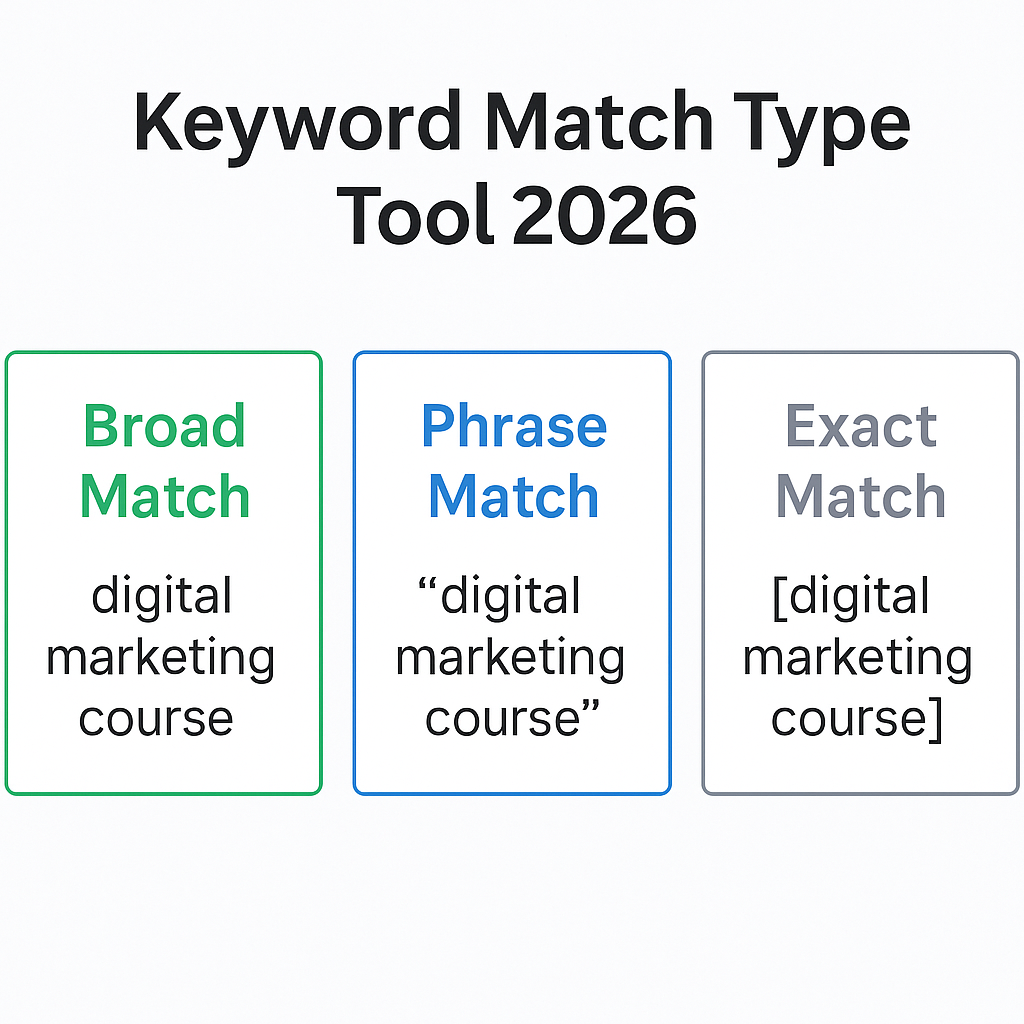
Broad Match
Your ad can appear for any related searches, synonyms, and similar topics.
Example: digital marketing course may match marketing classes, learn digital skills, etc.
Phrase Match (“keyword”)
Your ad appears for searches containing your phrase in the same order.
Example: “digital marketing course” → shows for best digital marketing course online.
Exact Match [keyword]
Your ad appears for very specific searches or close variations.
Example: [digital marketing course] → shows when someone searches this exact phrase.
BMM (+keyword)
Broad Match Modifier (BMM) adds a plus sign before each word.
Example: +digital +marketing +course
Although Google Ads no longer officially supports BMM, many marketers still use it to structure or analyze campaigns.
Why This Tool Is Important for Google Ads Users
Managing keyword match types manually takes time and can lead to errors.
This tool helps by:
Saving hours of manual formatting
You do not need to type quotes, brackets, or plus signs manually.
Reducing mistakes
One wrong bracket or missing quote can break your keyword list.
Improving Google Ads performance
Correct match types help control your budget and improve conversions.
Creating clean keyword lists
The tool produces clean, structured, ready-to-upload keywords.
Faster client delivery
Freelancers and agencies can prepare keyword lists much faster.
Better PPC campaign structure
Well-structured match types lead to better quality traffic and lower CPC.
Overall, this tool makes your keyword setup smooth, accurate, and beginner-friendly.
How This Tool Works (Step-by-Step)
-
Paste your keywords in the input box (one keyword per line).
-
Select the match types you want — Broad, Phrase, Exact, BMM.
-
Add prefix or suffix if needed (optional).
-
Choose output format — newline or comma-separated.
-
Click “Generate” and the tool will instantly create all variations.
-
Copy your results or download them as a .txt file.
This process makes your Google Ads setup extremely efficient.
Real-Life Example of Keyword Match Types
Let’s assume your keyword is:
best digital marketing institute
The tool will generate:
-
Broad: best digital marketing institute
-
Phrase: “best digital marketing institute”
-
Exact: [best digital marketing institute]
-
BMM: +best +digital +marketing +institute
-
Negative (optional): -best digital marketing institute
This helps you target your users in different levels of intent.
Who Should Use This Tool?
This keyword match type tool is useful for:
-
Google Ads beginners
-
Performance marketers
-
PPC managers
-
Digital marketing agencies
-
Freelancers
-
E-commerce advertisers
-
Lead generation businesses
-
Students learning Google Ads
Anyone who handles PPC campaigns will benefit from this tool.
Benefits of Using Proper Match Types
-
Lower wasted spend
You can avoid showing ads to irrelevant searches. -
Higher conversion rate
Exact match and phrase match target more precise users. -
Better budget control
Broad match can bring large traffic, but with correct usage, you can manage costs. -
Improved Quality Score
Relevant searches lead to better ad quality. -
More targeted audience
Negative keywords block useless clicks. -
Campaign clarity
You create organized and easy-to-understand keyword lists.
Tips for Using Match Types Effectively
-
Use Exact for high-intent keywords
-
Use Phrase for mid-level searches
-
Use Broad only when needed
-
Add negative keywords regularly
-
Always test different match types
-
Use phrase match in most campaigns (best balance)
-
Avoid overusing broad match unless you track performance closely
These tips help you improve your ROI.
Conclusion
Keyword match types are the backbone of any successful Google Ads campaign. Without proper match structures, your budget can disappear very quickly. This free keyword match type tool makes the entire process easy, fast, and reliable. With one click, you can generate Broad, Phrase, Exact, BMM, and Negative keywords and use them directly in your campaigns.
Whether you’re a beginner or a professional, this tool helps you save time, reduce errors, and improve your PPC results. Paste your keywords, choose your match types, and generate clean keyword lists instantly. Start using the tool above and make your Google Ads campaigns more effective and well-organized.
FAQs
1. What is a keyword match type tool?
It is a tool that converts plain keywords into Broad, Phrase, Exact, and Negative match types for Google Ads.
2. What does an exact match keyword generator do?
It adds brackets around your keyword to create an exact match like: [keyword].
3. What is phrase match?
Phrase match uses quotes, such as “digital marketing course”, to target searches containing your exact phrase.
4. What is broad match used for?
Broad match helps your ads show for many related searches, synonyms, and variations.
5. Why are match types important in Google Ads?
They control how your ad appears, helping you reduce wasted spend and target the right users.
6. Does this tool support multiple keywords?
Yes, you can paste hundreds of keywords and generate match types instantly.
7. Does Google still use BMM?
Google removed BMM officially, but many marketers still prefer +keywords for internal structure and campaign clarity.
8. Is the tool free to use?
Yes, this match type generator is completely free.
09. Does the tool work for SEO keywords?
It is made for PPC, but broad match versions can be used for SEO research.