Running Google Ads can feel like a guessing game. You set a budget, write a few ads, and hope the right people click. But if you are getting clicks without sales, there is a high chance something is wrong in your setup or strategy. I have seen many businesses spend money on ads without proper tracking or optimization, which leads to a massive wasted budget. A proper review of your account can uncover hidden leaks draining your money. Small changes like fixing your targeting, improving your ad copy, or setting up proper conversion tracking can significantly improve your results. This Google Ads Audit Checklist guide walks you through a step-by-step checklist to find and fix those expensive mistakes. We will look at exactly what you need to check, why it matters, and how to get your campaigns back on track.
Why Most Google Ads Campaigns Waste Budget
Many accounts bleed money silently. The most common problems include paying for irrelevant clicks, targeting the wrong locations, or bidding too much for keywords that rarely convert. When these issues pile up, you end up with high costs per click (CPC) and very few sales.
Let’s look at a real-world scenario. You might notice your Return on Ad Spend (ROAS) looks stable, so you assume your campaigns are healthy. However, behind the scenes, your campaign might be over-indexing on retargeting people who already bought from you. Because the system claims credit for these easy sales, it stops actively looking for new customers. Your cost to acquire a new buyer skyrockets, but the platform makes it look like you are winning. This is exactly why you need to dig deeper into your data.
What is a Google Ads Audit?
A Google Ads audit is a thorough health check of your advertising account. It involves looking at your campaign settings, keywords, ads, and tracking to make sure everything works together efficiently.
Business owners use audits to ensure their marketing dollars are actually working. Freelancers and marketing agencies use them when taking over a new client account to find quick wins and long-term growth opportunities.
Benefits of Doing a Google Ads Audit
Taking the time to review your account provides several major advantages:
- Improve your ROI: By cutting out wasted spend, more of your budget goes toward clicks that actually generate revenue.
- Reduce wasted spend: You will spot irrelevant search terms and bad placements before they drain your daily budget.
- Better conversion tracking: You can trust your data again once you confirm your tracking tags fire correctly.
- Smarter optimization: You give the algorithm cleaner data, which helps Google’s automated systems find better customers for you.
Complete Google Ads Audit Checklist 2026
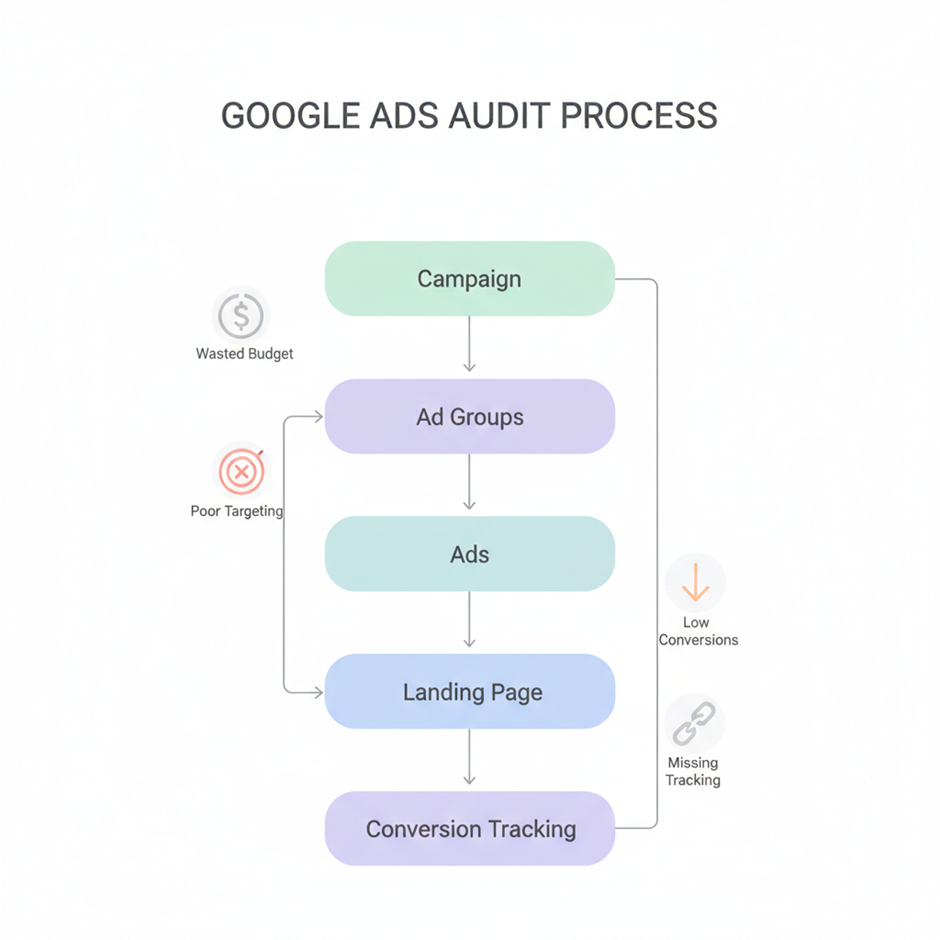
1. Campaign Level Audit
Start by looking at the big picture. Are you using the right campaign type? Search campaigns are great for high-intent keywords, while Performance Max works well for reaching people across multiple channels. Check your bidding strategy next. If you want leads, an automated strategy like Maximize Conversions usually works better than Manual CPC.
Review your budget allocation. Make sure your best-performing campaigns are not running out of money by lunchtime. Finally, double-check your location and device targeting. If you only ship products within the United States, ensure your location settings strictly exclude other countries.
2. Ad Group Structure Audit
In most audits I have done, the problem is not the platform but how the campaigns are structured. A messy account confuses the system. Your ad groups should be tightly themed. Avoid dumping 50 different keywords into one ad group.
Instead, group them by specific intent or product category. For example, if you sell shoes, create one ad group for “running shoes” and a completely separate one for “basketball shoes.” This allows you to write highly specific ads that perfectly match the user’s search.
3. Keyword Audit (MOST IMPORTANT)
Keywords are the foundation of your search campaigns. Check your match types closely. Using too many broad match keywords without a solid negative keyword list is the fastest way to lose money.
Look at your search terms report to find exactly what people typed into Google before clicking your ad. Add any irrelevant terms to your negative keyword list immediately. Also, pause keywords that get plenty of clicks and have a high cost, but never lead to a sale.
4. Ads & Copy Audit
Your ads need to be highly relevant to the keywords in your ad group. Look at your click-through rate (CTR). If it is low, your ad copy might be boring or irrelevant to the searcher.
Make sure your headlines are catchy and your descriptions clearly explain the benefits of your product. Always use ad extensions (now called assets), like sitelinks and callouts. These make your ad look bigger on the search results page and give users more reasons to click.
5. Landing Page Audit
Getting a click is only half the battle. If your landing page does not match the promise in your ad, the user will leave immediately. Check your page speed and make sure the site works perfectly on mobile devices.
Your call to action (CTA) must be obvious. Whether you want people to fill out a form or buy a product, make that step as simple as possible. Include trust signals like customer reviews and security badges to make visitors feel safe doing business with you.
6. Conversion Tracking Audit
If you cannot measure it, you cannot improve it. Verify that your tracking code is properly installed on your website.
Check for missing events or duplicate tracking. Sometimes an account will record two conversions for a single purchase, which tricks the system into thinking a campaign is performing twice as well as it actually is. Setting up enhanced conversions can also help you track users more accurately across different devices. If you haven’t implemented it yet,
Here’s a complete guide on how to set up enhanced conversions
Common Google Ads Mistakes That Kill Performance
During audits, I frequently see the same expensive errors repeating across different accounts:
- Wrong targeting: Leaving location settings on “Presence or interest” means people outside your target area can still click your ads. Change this to “Presence” to only target people physically located in your chosen area.
- No negative keywords: Without exclusions, a roofing company might pay for clicks from people searching for “how to fix a roof yourself.”
- Poor landing pages: Sending ad traffic to a generic homepage instead of a specific product page kills your conversion rate.
- No tracking setup: Running ads without tracking is essentially giving Google a blank check and hoping for the best.
Advanced Google Ads Audit Tips (2026 Trends)
Advertising platforms change rapidly. Here is what you need to look out for to stay ahead of the curve as we move through 2026.
- AI bidding optimization checks: Smart bidding uses artificial intelligence to set the right price for every auction. Make sure your campaigns have enough data (ideally 30 conversions a month) so the AI can actually learn what a good customer looks like.
- Performance Max audit strategy: Performance Max campaigns now manage massive portions of ad spend. To audit them properly, check your asset variety. Make sure you have at least 15 images, multiple videos, and plenty of text variations. Ensure you have brand exclusions in place so the campaign does not waste money bidding on your own company name.
- Audience signals optimization: Upload your customer email lists so the system knows exactly who your best buyers are. Using a layered approach of first-party data and custom search segments helps the algorithm learn much faster.
- Data-driven attribution: Stop relying on “last click” attribution. Data-driven attribution gives fractional credit to every ad a person clicked before they finally bought. This provides a much clearer picture of how your different campaigns work together to drive sales.
Google Ads Audit Checklist (Quick Summary Table)
Here is a quick breakdown of everything you need to review.
| Audit Category | What to Check |
| Campaign Setup | Campaign types, bidding strategies, budgets, location settings |
| Ad Groups | Thematic grouping, relevant keyword segmentation |
| Keywords | Match types, search terms report, negative keyword lists |
| Ads & Copy | Click-through rates, headline relevance, ad extensions |
| Landing Pages | Mobile speed, ad relevance, clear CTA, trust signals |
| Tracking | Tag installation, conversion accuracy, duplicate events |
When Should You Hire a Google Ads Expert?
Auditing an account yourself is a great way to learn, but it can quickly become overwhelming. If you are spending thousands of dollars a month and your cost per lead keeps climbing, it is a clear sign you need help.
Think about the cost versus the benefit logic. If an expert charges you a fee but finds a way to cut $2,000 in wasted ad spend every month, that service pays for itself immediately. A professional eye can spot complex tracking issues, fix automation conflicts, and structure your account for long-term growth so you can focus on running your actual business.
Fix Your Ads Before Spending More
Running a successful advertising campaign requires constant attention. The platform will happily spend your money, but it is your job to guide it in the right direction.
By following this google ads audit checklist, you can identify where your budget is leaking and make the necessary adjustments to turn things around. Take an hour this week to look at your search terms, check your landing pages, and verify your tracking. The improvements to your bottom line will be well worth the effort.
FAQs
How often should you audit Google Ads?
If you spend a significant amount on ads, you should do a quick check every month and a deep audit every quarter. Smaller accounts can usually get by with a thorough quarterly review.
What tools are best for Google Ads audit?
The built-in Google Ads reports and Google Analytics 4 (GA4) are your best starting points. Google Tag Manager is also essential for checking if your conversion tracking fires correctly.
Can I audit Google Ads myself?
Yes. Anyone can perform a basic audit by checking their search terms, tracking setups, and budget allocations. However, advanced issues with AI bidding and cross-channel attribution often require professional experience to fix properly.
How long does a Google Ads audit take?
A basic health check might take a few hours. A comprehensive audit for a large account with multiple campaigns can take anywhere from three to five days to complete properly.